Alienware AW2524HF Review: Low Latency, Clean Motion
By Eli Nolan | Published February 2, 2026
The Alienware AW2524HF is one of those monitors that makes total sense only if you know exactly what kind of gaming you’re optimizing for.
This is not a “pretty picture” monitor. It is not a “cinematic HDR” monitor. It is not a “my new 4K setup looks insane” monitor. The AW2524HF is a purpose-built competitive panel whose entire personality is: give me the cleanest motion and lowest latency feel you can get from a mainstream 1080p display.
If that sounds like your world—CS2, Valorant, Overwatch, Apex, Rocket League, Fortnite performance mode, anything where you’re chasing feel and clarity—this monitor can be a legitimate upgrade over 240Hz and even 360Hz. Not because your K/D magically changes overnight, but because the screen starts to feel less like a display and more like a window.
If you don’t live in that world, the AW2524HF can also be a very expensive way to learn that refresh rate isn’t the same thing as “better gaming.”
This is the updated 2026 look at the AW2524HF, written for gamers who want the truth: what it nails, what it compromises, and what to avoid.
Quick take
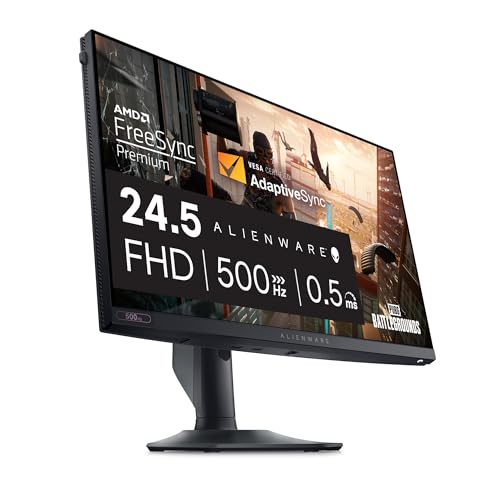
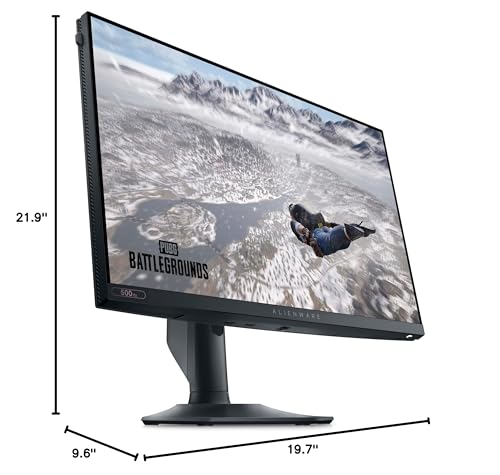
- The AW2524HF is a 24.5-inch 1080p Fast IPS monitor that can run up to 500Hz.
- It’s for competitive gaming, not for “make everything look gorgeous.”
- It is at its best when your PC can actually deliver very high, stable FPS.
- It’s a better buy for most people than the pricier “full-feature” version, because the core experience here is still about speed.
If you want to see current pricing and availability, here’s the monitor: Alienware AW2524HF.
The MonitorNerds way to think about 500Hz
A lot of gamers read “500Hz” and assume it’s a massive upgrade from 240Hz, the same way 144Hz used to feel massive compared to 60Hz.
It’s not that kind of jump.
The jump from 60 to 144 changes your entire relationship with motion. The jump from 144 to 240 makes tracking feel easier and reduces the “blur smear” vibe. The jump from 240 to 360 is real, but it’s subtle. The jump from 360 to 500 is even more subtle, and it only pays off if you’re the kind of gamer who notices the last 10% of motion clarity and is already optimizing your entire setup for input latency and consistency.
Here’s the honest rule:
If you are not already a “settings tweaker” who prioritizes consistent FPS, you probably don’t need 500Hz.
But if you are that person, the AW2524HF is one of the most accessible ways to get there without going fully down the pro esports rabbit hole.
Specs that actually matter
Panel, size, and resolution
The AW2524HF is a 24.5-inch 1920×1080 panel. That is the correct resolution for this refresh rate class, because 500Hz is a speed goal and 1080p is how you keep your FPS high enough to use it.
If you were secretly hoping this would be “500Hz at 1440p,” this is not that product category. 1440p high-refresh is a different lane.
Refresh rate behavior
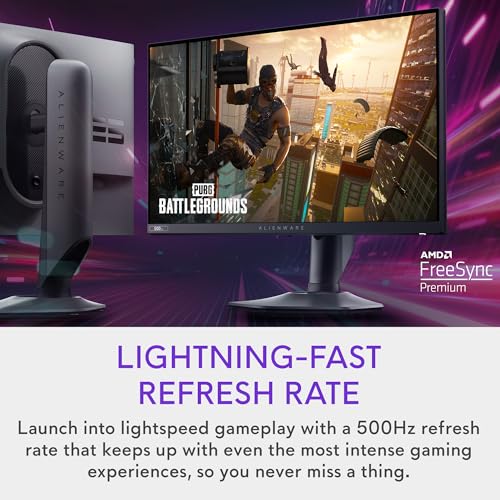
The important detail with this monitor is that 500Hz is the overclocked mode. You can run it at lower refresh rates, and you should, depending on what you’re doing.
In practice, you’ll end up with two gamer profiles:
- A “competitive” profile where you push the refresh rate as high as your system can sensibly handle.
- A “general” profile where you still run high refresh, but you don’t stress your PC as much, and you avoid chasing a number for no reason.
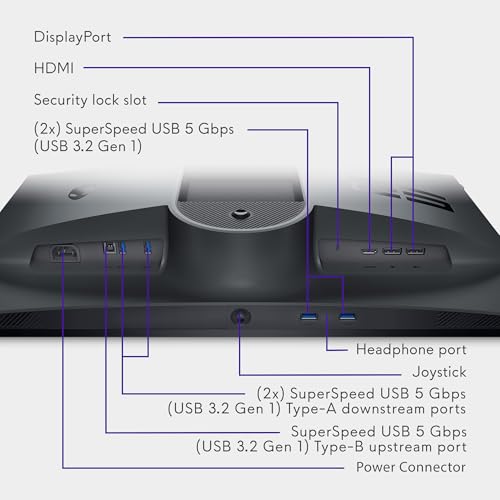
Ports and the “don’t be mad at yourself later” warning
This is where people mess up.
You do not buy this monitor and then run it over HDMI expecting 500Hz.
If you do that, you will not get the full refresh rate.
If you want the headline refresh rates, you want to use DisplayPort and set the monitor correctly.
The safest “buy once, set it up, done” approach is:
- Use DisplayPort.
- Set the refresh rate in Windows/NVIDIA/AMD control panel.
- Confirm in-game that your FPS and frame pacing are stable.
This sounds basic, but it’s the #1 reason gamers buy a high-refresh monitor and then feel like “it doesn’t look different.”
What the AW2524HF is great at
Motion clarity that feels instantly “faster”
When you get the AW2524HF set correctly, the first thing you notice is that the screen feels less smeary during rapid camera movement. Tracking targets becomes less visually fatiguing. Your eyes don’t have to work as hard to keep up with motion, and that can matter more than people think during long sessions.
This is the main reason 500Hz exists. It’s not about a marketing number. It’s about reducing the persistence blur and making motion look cleaner when you are snapping your view around constantly.
If you mostly play games where your view moves slowly, you will not get the same payoff.
If you play games where you’re constantly flicking, snapping, tracking, and micro-correcting your aim, you will.
Responsiveness and “connected” feel
Esports monitors are basically a chain of tiny advantages, and what you’re buying here is a tighter feel. It’s the combination of high refresh, low input lag behavior, and fast pixel response that makes the screen feel more immediate.
Gamers describe this as “it feels like my mouse is directly connected to the pixels.” That’s not a scientific phrase, but it’s an accurate experience when everything is tuned well.
A sane IPS daily experience
This is one of the underrated strengths of the AW2524HF.
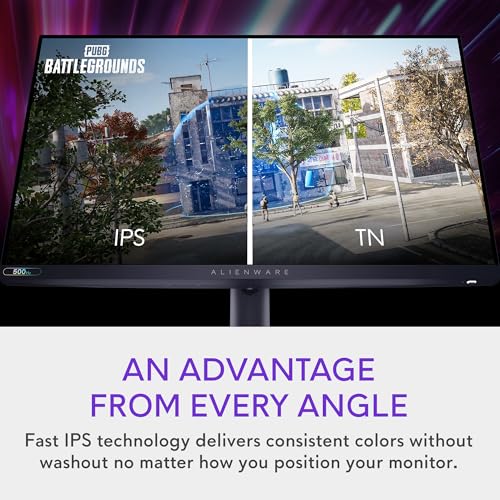
A lot of extreme esports monitors use TN variants to chase speed. TN can be amazing for motion, but it can also be annoying for daily use because of viewing angles and how the image shifts as you move your head.
The AW2524HF’s Fast IPS panel gives you a more normal day-to-day experience. It’s still clearly an esports monitor, but it doesn’t punish you for using it like a normal display.
Where the AW2524HF is not trying to win
HDR is not the point
Yes, the AW2524HF is marketed with HDR support, but you should not buy this for HDR as an “experience.”
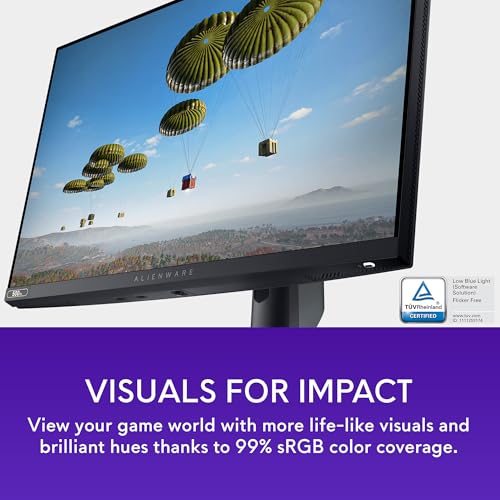
This is a monitor you buy because you want a fast, clean SDR picture with high refresh and predictable behavior. If you want “HDR wow,” you’re shopping in the OLED and Mini‑LED world.
This is not a knock on the monitor. This is the entire point: you are choosing speed over spectacle.
1080p is a deliberate trade
Some gamers see 1080p and assume “budget.” That’s the wrong mindset here.
1080p is what allows:
- very high FPS,
- consistent frame times,
- lower GPU load,
- and less thermal noise from your system.
If you’re running an RTX 4070/4080/4090 and thinking “why would I pair this with 1080p,” the answer is: because competitive gaming is often CPU-bound and latency-bound, and resolution is not the main win condition.
If your main joy is story games and visual fidelity, this monitor is in the wrong lane for you.
Setup tips that actually matter
Use a sane refresh rate strategy
A lot of gamers set 500Hz once and never think again. That’s fine, but there’s a smarter way.
If you have a powerful system and you play esports titles, you can push the refresh rate high. But if you’re playing a slower game, or you’re doing general desktop work, you can run a lower refresh rate profile and keep everything cooler and quieter.
The key is: don’t chase 500Hz as a trophy. Chase consistency.
Cap FPS with intention
Gamers often run uncapped FPS because they want the lowest input latency possible. That can make sense, but only if your frame pacing is stable.
If you see wild FPS swings, that instability can feel worse than a slightly lower but stable cap.
The MonitorNerds approach:
- If your FPS is stable, let it run.
- If your FPS fluctuates, cap it slightly below your typical high.
- Prioritize smooth frame pacing over chasing a peak number.
Overdrive settings
High refresh IPS monitors live and die by overdrive tuning. Too low and you get blur. Too aggressive and you get inverse ghosting.
The most useful approach is simple:
- Start at the default or “fast” setting.
- Test in motion-heavy scenarios.
- If you see bright trailing artifacts, back down one step.
Don’t assume “fastest” is always the best. With IPS, “fastest” often exists for a spec sheet, not for your eyeballs.
Who should buy the AW2524HF in 2026
Buy it if:
- You play competitive shooters or fast esports titles as your main hobby.
- You actually notice motion clarity and you care about “feel.”
- You can run high FPS consistently in your main games.
- You want a fast esports monitor that still behaves like a normal IPS display day-to-day.
Don’t buy it if:
- You mostly play single‑player games and want visual fidelity.
- You want HDR that looks dramatic.
- You’re hoping this monitor will make 1080p “look like 1440p.”
- You can’t realistically run high FPS in your main titles and you don’t want to optimize settings.
This is not a judgey list. It’s the difference between loving this monitor and feeling confused about why you spent this much money.
What to avoid with this monitor
Avoid HDMI for the headline refresh rates
If you buy the AW2524HF, use DisplayPort for the refresh rate you’re paying for.
If you are forced to use HDMI due to a device limitation, accept that you are not using the full capability of the monitor and make peace with that. Don’t let it become a “this monitor is overrated” situation caused by the cable and the port choice.
Avoid pairing it with a system that cannot hold high FPS
This is the biggest “wasted purchase” scenario.
If your system is struggling to maintain high, stable FPS in the games you actually play, 500Hz becomes a number you own, not a benefit you feel.
Avoid buying it as an “everything monitor”
You can use it for everything, but that doesn’t mean it’s the best value for everything.
If you want one monitor for competitive gaming, creative work, and beautiful single-player visuals, you want a different lane, usually 1440p high-refresh IPS or a good OLED/Mini‑LED depending on your priorities.
The AW2524HF is honest about its identity. The regret happens when a gamer asks it to be something it’s not.
Alternatives we recommend
The AW2524HF is a strong choice for its lane, but there are two other lanes that might fit you better depending on your priorities.
If you want strobing motion clarity and a classic esports feel
A lot of pro-focused esports monitors are still loved because of their backlight strobing and motion clarity tuning.
A common alternative in the “esports-first” world is the BenQ Zowie XL2566K. This is not an “everything” monitor either. It’s a purpose-built competitive display that’s popular for a reason: it’s tuned for the kinds of games where motion clarity and consistency matter more than color depth and HDR marketing.
If you want the absolute highest refresh rate lane
If you are the kind of gamer who just wants the top of the “speed ladder,” there are models above 500Hz.
The ASUS ROG Swift Pro PG248QP is in that “max refresh rate” class.
This is for the gamer who already knows they are chasing the last few percent and is fine paying for it. It’s not the value pick. It’s the “I want the fastest” pick.
Related MonitorNerds reads
If you’re building out a full setup or you’re still deciding which “lane” you’re in, these guides will save you time:
- If you’re shopping around a modern NVIDIA GPU, start here: Best Monitor for RTX 4070, Best Monitor for RTX 4080, and Best Monitor for RTX 4090.
- If you’re trying to decide between “wow picture” and “worry-free brightness,” read OLED vs Mini-LED in 2026.
- If you’re deliberately avoiding OLED for daily desktop reasons, this is the straight talk guide: I Don’t Want OLED: What to Buy Instead.
- If you’re shopping on a tighter budget (or buying a second monitor), here are our picks: Best Budget Gaming Monitors Under $300.
And if you want to compare the “HF” to its sibling, we also have an older breakdown of the lineup here: Alienware AW2524H review.
MonitorNerds verdict
The Alienware AW2524HF is one of the cleanest “modern esports monitor” purchases you can make in 2026 if you understand what it is.
It’s a speed-first 1080p IPS display that exists to make motion cleaner and input feel tighter in competitive games. It’s not a “make games look gorgeous” monitor. It’s not a “true HDR” monitor. It’s not trying to compete with 1440p and 4K panels on detail.
It’s trying to be fast and usable, and in that lane it does its job extremely well.
If you primarily play competitive titles, your PC can hold high FPS, and you want an IPS panel that feels like it was built for esports without turning into a daily annoyance, this monitor makes sense.
If your gaming life is mostly cinematic single-player and you want the screen to impress you with visual drama, skip it and spend the money in a different category.
As an Amazon Associate, MonitorNerds may earn from qualifying purchases.
Gallery


About the Author

Eli Nolan
Eli Nolan is a seasoned tech enthusiast and gaming monitor specialist. With years of experience testing the latest display technologies, Eli provides deep insights into performance, color accuracy, and value. When not benchmarking monitors, he can be found exploring the latest open-world RPGs or fine-tuning his workstation setup.