BenQ MOBIUZ EX321UX Review: The Ultimate Console & Mac Hybrid Hub
By Paolo Reva | Published June 26, 2026
BenQ MOBIUZ EX321UX Quick Take
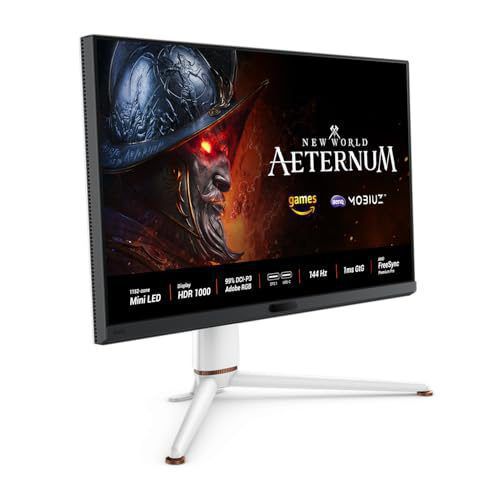
| Display Panel | 31.5-inch 4K UHD (3840 x 2160) 1,152-Zone Mini-LED IPS |
| Refresh Rate & Response | 144Hz, 1ms GtG |
| Brightness & HDR | 1,000 nits Peak HDR, VESA DisplayHDR 1000 |
| Audio & Connectivity | HDMI 2.1 eARC 7.1ch Passthrough, USB-C 65W PD, KVM |
Pros
- 1,152 local dimming zones for high-impact HDR without ABL dimming
- Exclusive eARC port passes Dolby Atmos to soundbars
- Standard RGB subpixel layout ensures razor-sharp text clarity
Cons
- High price tag compared to standard 4K 144Hz IPS displays
- 65W Power Delivery can be slow for 16-inch MacBook Pros
The dream of a single-monitor setup that handles both high-end gaming and professional work is a common one, but it is rarely realized without frustrating compromises. A typical workstation setup involves a maze of cables, multiple switch boxes, and a constant struggle to route audio correctly. (For a full survey of top displays, see our guide on the best gaming monitors).
Until now. The BenQ MOBIUZ EX321UX makes a bold promise: this is the only monitor your PS5 and your MacBook will ever need.
Featuring a gorgeous 32-inch 4K Mini-LED panel, an integrated KVM switch, single-cable USB-C connectivity, and a game-changing eARC audio port, the EX321UX is a premium, highly versatile powerhouse designed to act as the ultimate hub for modern hybrid workspaces. Let's dive deep into what makes this display special, how its unique features perform in the real world, and whether it justifies its premium price tag.
Key Specifications
| Feature | Specification |
|---|---|
| Screen Size | 31.5 inches |
| Resolution | 3840 x 2160 (4K UHD) |
| Panel Type | IPS-ADS with Mini-LED backlighting |
| Refresh Rate | 144Hz |
| Local Dimming | 1,152 zones |
| Peak Brightness | 1000 nits (HDR); 700 nits (SDR typical) |
| HDR Certification | VESA DisplayHDR 1000 |
| Response Time | 1ms (GtG) |
| Color Gamut | 99% Adobe RGB / 99% DCI-P3 |
| Video Inputs | 1x DisplayPort 2.1, 3x HDMI 2.1 (including 1x eARC) |
| USB Connectivity | 1x USB-C (65W PD, DP Alt Mode), 1x USB-C (downstream), 3x USB-A |
| Extras | Built-in KVM Switch, HotKey Color Dial wireless remote, AMD FreeSync Premium Pro |
The Hybrid Hub: KVM, USB-C 65W PD, and HDMI 2.1
A true hybrid monitor needs to make switching between devices effortless. The EX321UX achieves this by integrating a robust suite of I/O ports and peripheral-sharing tools that directly cater to both the console gamer and the macOS professional.
Single-Cable Convenience for MacBooks
For MacBook users, the monitor's dedicated USB-C port is a massive quality-of-life upgrade. Supporting DisplayPort Alt Mode and 65W Power Delivery, it allows you to connect your laptop with a single USB-C cable. This single connection transmits 4K video, routes data from your peripherals, and delivers 65W of power to keep your MacBook charged throughout the workday. While 65W is slightly lower than the 90W ports found on some dedicated office monitors, it is more than sufficient to keep a 14-inch or 16-inch MacBook Pro powered during standard office and creative tasks.
Seamless Peripheral Sharing with the Built-In KVM
If you have a dual-system setup (like a MacBook Pro for work and a gaming PC or console for play), the built-in KVM (Keyboard, Video, Mouse) switch is indispensable. By plugging your keyboard, mouse, and other peripherals directly into the monitor's USB-A ports, you can control both systems with a single set of input devices. The monitor automatically toggles your peripherals to whichever video input is active, drastically cleaning up desk clutter and eliminating the need for expensive external switch boxes.
Uncompromising HDMI 2.1 for Next-Gen Consoles
When the workday ends, the EX321UX transforms into a top-tier console gaming display. It features full-bandwidth HDMI 2.1 ports that support the maximum capabilities of the PlayStation 5 and Xbox Series X. You can enjoy console gaming at a fluid 4K resolution at 120Hz, complete with Variable Refresh Rate (VRR) and Auto Low Latency Mode (ALLM). Fast-paced shooters and sports games feel incredibly responsive, with no screen tearing or judder.
The eARC Audio Revolution: Living-Room Sound at Your Desk
Most monitors treat audio as an afterthought, offering tinny built-in speakers or a basic 3.5mm analog headphone jack. Consoles like the PS5 and Xbox Series X do not have optical audio outputs, meaning gamers who wanted premium sound at their desks were forced to settle for stereo output or use messy HDMI audio extractors that often break VRR or HDR compatibility.
BenQ solves this with a feature almost never seen on computer monitors: eARC (Enhanced Audio Return Channel) support.
By designating one of its HDMI 2.1 ports (HDMI 3) as an eARC port, the EX321UX allows you to pass uncompressed, high-bitrate audio directly from the monitor to an external sound system.
How the Setup Works
- Connect your console (PS5/Xbox) or PC to the monitor's HDMI 1 or HDMI 2 inputs.
- Connect a premium, eARC-compatible soundbar (like a Sonos Arc or Bose Smart Ultra) to the monitor's HDMI 3 (eARC) port.
- Enable eARC in the monitor's OSD (On-Screen Display) audio settings.
- Set your console or PC audio output to pass through surround sound formats (like 7.1 LPCM or Dolby Atmos).
The monitor extracts the high-resolution audio from the console's HDMI signal and routes it back down the eARC channel to the soundbar. This enables a true living-room quality audio experience—including spatial Dolby Atmos and uncompressed 7.1 channel surround sound—right at your desk. It is a game-changing feature for anyone who wants a clean desk setup without sacrificing cinematic audio immersion.
Display & Visual Performance: Mini-LED Mastery
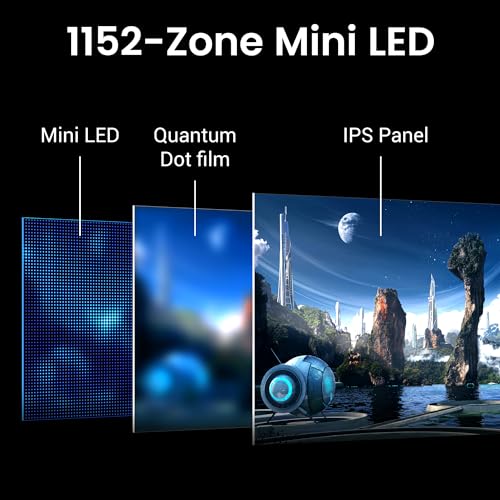
At the heart of the EX321UX is a stunning 31.5-inch 4K panel that leverages 1,152-zone Mini-LED backlighting.
Traditional IPS panels suffer from relatively low contrast and a distracting "IPS glow" in dark scenes. By replacing the standard edge-lit backlight with thousands of microscopic LEDs grouped into 1,152 independently controlled zones, BenQ has dramatically elevated the contrast and HDR performance. If you are debating between display types, check out our guide comparing OLED vs Mini-LED, or read our recommendations if you are looking for alternatives to OLED screens.
High-Impact HDR and Blinding Highlights
With a VESA DisplayHDR 1000 certification, the EX321UX delivers high-impact HDR content. It is capable of pushing up to 1,000 nits of peak brightness, making sunbursts, explosions, and magical effects pop with stunning intensity. Thanks to the high density of local dimming zones, the monitor can display bright highlights right alongside deep, inky blacks. While some minor haloing (blooming) can still be observed around white text on a black background, it is minimal and vastly superior to traditional LCD screens.
Creator-Class Color Accuracy
MacBook users and digital creators will appreciate the monitor's exceptional color gamut. The EX321UX covers 99% of the Adobe RGB and 99% of the DCI-P3 color spaces. Out of the box, colors are vibrant, saturated, and highly accurate. Whether you are editing photos, grading video in DaVinci Resolve, or printing assets, the display provides the professional-grade color accuracy you need.
Gaming Performance: Smooth and Responsive
For PC gaming, the panel supports a 144Hz refresh rate and has a rated 1ms GtG response time. Combined with AMD FreeSync Premium Pro and G-Sync compatibility, motion is silky smooth with virtually zero input lag. Fast motion remains clear and sharp, giving competitive PC and console gamers an edge in high-stakes matches. You can compare this with other top-tier options in our list of the best gaming monitors handpicked by MonitorNerds.
Usability: The HotKey Color Dial Remote
Another thoughtful feature is the included HotKey Color Dial wireless remote. Instead of reaching under the bottom bezel to fumble with an OSD joystick, you can adjust brightness, switch inputs, change volume, and tweak game settings using the compact remote. It makes managing a multi-device setup vastly more convenient, especially when switching back and forth between a MacBook and a PS5.
Verdict: The Ultimate Hybrid Hub
The BenQ MOBIUZ EX321UX is a premium, thoughtfully engineered monitor that successfully solves the multi-device headache. By combining creator-class color accuracy, next-gen console compatibility, a built-in KVM, and groundbreaking eARC audio support, it stands as the absolute premier choice for a Mac and console hybrid setup.
Pros
- Stunning Mini-LED display with 1,152 dimming zones and VESA DisplayHDR 1000.
- Game-changing eARC support passes Dolby Atmos and 7.1 audio to premium soundbars.
- Excellent MacBook integration via a single-cable USB-C port with 65W PD.
- Built-in KVM switch simplifies dual-system mouse and keyboard sharing.
- Stellar color coverage (99% Adobe RGB and 99% DCI-P3) for creative work.
- Convenient wireless remote control for seamless OSD navigation.
Cons
- Premium price tag puts it in competition with high-end OLED displays.
- 65W Power Delivery is good, but 90W or higher would be ideal for power-hungry 16-inch MacBooks.
- No portrait rotation on the stand (height, tilt, and swivel only).
If you are looking for a single display to serve as the centerpiece of your gaming and work setup, the BenQ MOBIUZ EX321UX is unmatched in its class. It is the ultimate hybrid hub that makes compromises a thing of the past.
You can check out the monitor on Amazon here: https://www.amazon.com/dp/B0D2LXLN75?tag=monitnerds-20
Gallery


About the Author

Paolo Reva
Paolo is a gaming veteran since the golden days of Doom and Warcraft and has been building gaming systems for family, friends, and colleagues since his junior high years. High-performance monitors are one of his fixations and he believes that it’s every citizen’s right to enjoy one. He has gone through several pieces of hardware in pursuit of every bit of performance gain, much to the dismay of his wallet. He now works with Monitornerds to scrutinize the latest gear to create reviews which accentuate the seldom explained aspects of a PC monitor.