The Great OLED Backlash: Dealing with VRR Flicker and Text Fringing
By Paolo Reva | Published June 26, 2026
For the past few years, OLED has been championed as the undisputed king of display technology. Tech journalists, hardware reviewers, and gaming enthusiasts have loaded social media feeds with endless praise for its infinite contrast ratios, pitch-black dark scenes, and near-instantaneous 0.03ms response times. The pitch was simple: buy an OLED monitor, and you will experience visual perfection.
However, a quiet but distinct backlash has begun to sweep through online tech communities like /r/monitors and /r/buildapc on Reddit. Serving as a follow-up to our OLED vs. IPS analysis, this guide explores why hybrid users who game and work are starting to search for alternatives.
This backlash is driven by hybrid users—professionals who use their screens for 8 to 10 hours of heavy productivity (such as coding, copywriting, financial analysis, or spreadsheet management) during the day, before switching over to immersive gaming at night. For these users, the dream of a "perfect all-in-one monitor" has clashed with the realities of daily use. They are discovering that the very same design choices that make OLED panels phenomenal for entertainment introduce critical flaws in productivity environments.
Specifically, two core technological issues are causing buyers' remorse: Variable Refresh Rate (VRR) Flicker and Text Fringing. Here is a detailed breakdown of why these problems occur and how they impact the hybrid experience.
1. Variable Refresh Rate (VRR) Flicker: The Dark Scene Dilemma
To understand VRR flicker, we have to look at how self-emissive displays manage light and refresh rates.
The Technical Cause
In a traditional Liquid Crystal Display (LCD) like an IPS or VA panel, a separate backlight (often an array of LEDs) projects light through a layer of liquid crystals. The backlight remains constant, and the liquid crystals twist to block or let light through.
OLED (Organic Light-Emitting Diode) displays operate differently. There is no backlight. Instead, every single pixel is self-emissive, generating its own luminance based on the electric current (voltage) it receives.
When you enable a Variable Refresh Rate (VRR) technology like NVIDIA G-Sync or AMD FreeSync, your monitor dynamically matches its refresh rate to the fluctuating frame rate (FPS) of your graphics card. This ensures smooth, tear-free gaming. While high refresh rates are generally desirable (similar to why 360Hz monitors outperform 144Hz displays), VRR introduces specific stability challenges on self-emissive panels.
However, OLED pixels require precise, rate-dependent voltage curves to maintain stable gamma levels (the distribution of dark and light shades). Because OLED gamma curves are optimized for specific, steady refresh rates, rapid fluctuations in the frame rate require the monitor’s internal timing controller to constantly shift the driving voltage.
When frame rates fluctuate rapidly—such as during loading screens, in menu transitions, or when panning through demanding game scenes—these minor voltage changes cause brief, visible shifts in pixel luminance. Because the human eye is highly sensitive to light changes in dark environments, this voltage variance manifests as a rapid, rhythmic flickering in dark gray and near-black shades.
The Impact on Users
For productivity work, VRR flicker is rarely an issue because desktop applications run at a stable refresh rate. However, once you launch a game, it becomes highly apparent. Games that suffer from inconsistent frame pacing or have dark, atmospheric settings (such as Cyberpunk 2077, Alan Wake 2, or Diablo IV) will exhibit a distracting pulse in dark regions. Over time, this constant luminance shifting forces the eyes to adjust continuously, leading to rapid eye strain and fatigue during late-night gaming sessions.
2. Text Fringing and Eye Strain: The Subpixel Structural Misalignment
For developers, writers, and office workers, the second OLED drawback is even more problematic: fuzzy, colored text that causes physical discomfort.
The Technical Cause
Operating systems like Microsoft Windows render text based on the assumption that a monitor uses a standard RGB vertical stripe subpixel layout (Red, Green, Blue subpixels placed side-by-side in a horizontal row).
Subpixel rendering engines, such as Windows ClearType, use this physical layout to perform anti-aliasing. By lighting up specific edges of red, green, or blue subpixels at a sub-pixel level, the OS tricks the human eye into seeing smoother, sharper text curves than the screen's native resolution should allow.
OLED panels, however, do not use standard RGB vertical stripes:
- QD-OLED panels (particularly first- and second-generation models) utilize a triangular subpixel layout, where the red, green, and blue subpixels are arranged in a pyramid or triangular shape.
- WOLED panels (White OLED) often use an RWBG (Red, White, Blue, Green) subpixel structure, adding a white subpixel to boost peak brightness.
Because these physical layouts do not align with the linear layout expected by ClearType, the operating system's subpixel calculations fail. Instead of smoothing the edges of characters, the OS incorrectly illuminates subpixels, leading to chromatic aberration or color fringing. This manifests as a thin green or magenta border tracing the vertical edges of black text on a white background, or white text on a dark background.
The Impact on Users
While text fringing is virtually invisible from a distance or when viewing fast-moving game graphics, it is highly noticeable at normal desktop viewing distances (2 to 3 feet).
For users spending hours reading documentation, writing code in an IDE, or reviewing spreadsheets, text appears slightly out of focus, hazy, or smeared. The human brain continuously and unconsciously tries to refocus the eyes to resolve this blurriness. The result is a rapid onset of eye fatigue, headaches, dry eyes, and general physical exhaustion after just a few hours of work.
The Mini-LED and IPS Renaissance
Faced with these trade-offs, many hybrid professionals are stepping back from OLED and returning to high-end LCD screens. Specifically, Mini-LED and IPS Black displays have emerged as excellent compromises.
By replacing standard LCD backlights with thousands of microscopic LEDs grouped into hundreds or thousands of independent local dimming zones, Mini-LED monitors deliver near-OLED black levels and intense HDR highlights. Crucially, they use standard RGB subpixel structures (meaning perfectly sharp text) and are completely immune to VRR luminance flicker and burn-in.
If you are looking to move away from OLED or want a reliable, high-performance display that handles both professional workflows and high-end gaming, here are three outstanding alternatives.
BenQ MOBIUZ EX321UX: The Ultimate Premium Bridge
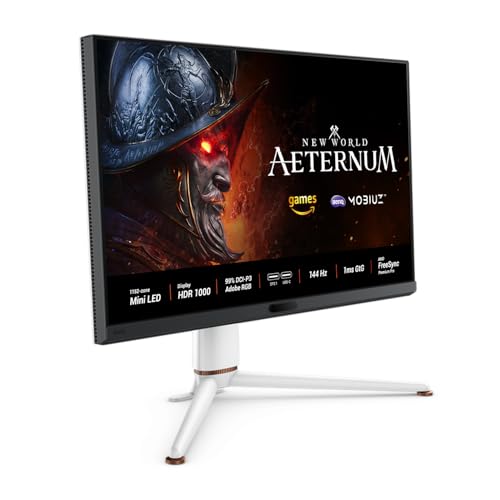
For professionals who refuse to compromise on visual quality, the BenQ MOBIUZ EX321UX represents the pinnacle of hybrid display design (read our full BenQ MOBIUZ EX321UX review for our in-depth test results). It utilizes a 32-inch 4K IPS panel paired with a state-of-the-art Mini-LED backlight featuring 1,152 independent local dimming zones.
At 32 inches, the 4K UHD resolution delivers a high pixel density of roughly 138 Pixels Per Inch (PPI). Combined with a standard RGB stripe subpixel layout, text is incredibly sharp and readable without any hint of fringing. The 1,152 dimming zones give it the contrast control needed to deliver breathtaking HDR performance, reaching a peak brightness of 1,000 nits.
Furthermore, because it is built on an IPS panel, you get wide, accurate viewing angles and a uniform color space (99% DCI-P3 coverage), which is vital for creative work. With a 144Hz refresh rate, standard VRR compatibility, and zero flicker, it serves as a top-tier gaming monitor and a reliable professional workstation.
https://www.amazon.com/dp/B0D2LXLN75?tag=monitnerds-20
KOORUI 27-Inch QD-Mini-LED (27E3QK): The Budget HDR Speedster
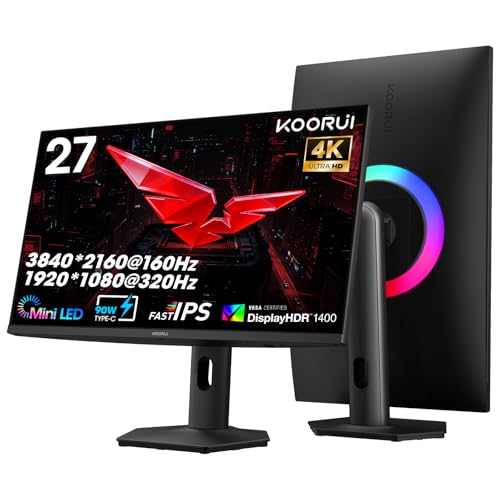
If you want the visual impact of Mini-LED local dimming and high-refresh-rate gaming without the premium price tag, the KOORUI 27E3QK is a remarkable value champion.
This 27-inch monitor runs at a native QHD (2560 x 1440) resolution with a blistering 240Hz refresh rate. It features a Quantum Dot Fast IPS panel backed by a Mini-LED array, offering deep contrast and vibrant colors that make gaming highly immersive. The 1440p resolution on a 27-inch screen provides a comfortable 109 PPI pixel density, which Windows handles natively at a 100% UI scale without rendering issues.
Because it utilizes a standard RGB layout, text remains clean and legible during daily office tasks. The monitor provides the high-speed motion clarity expected by competitive gamers while maintaining the day-to-day productivity comfort that OLED displays struggle to match at this price point.
https://www.amazon.com/dp/B0FBF7FCZW?tag=monitnerds-20
Dell UltraSharp U4025QW: The Ultimate Productivity Workspace
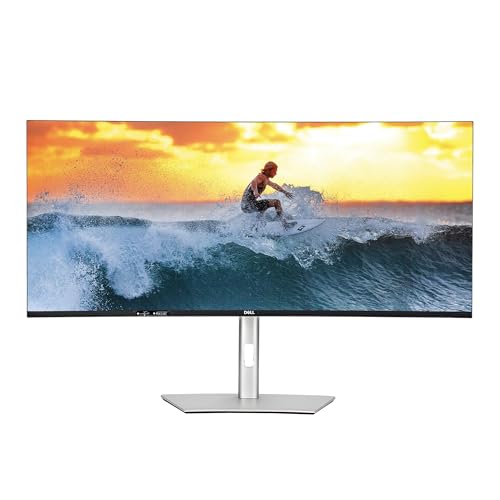
For users whose work demands maximum screen real estate and pristine text clarity above all else, the Dell UltraSharp U4025QW is a masterclass in monitor engineering.
This massive 40-inch curved ultrawide display features a 5K2K WUHD (5120 x 2160) resolution, which is essentially a 4K monitor stretched horizontally. It utilizes an IPS Black panel, a newer LCD technology that doubles the contrast ratio of traditional IPS panels from 1000:1 to 2000:1, providing significantly deeper blacks and richer colors.
With a high pixel density of 140 PPI, text rendering is razor-sharp. The curved screen wraps around your peripheral vision, reducing eye travel and neck strain when managing multiple windows, timelines, or code databases side-by-side.
While not a dedicated esports monitor, Dell has upgraded the refresh rate to a smooth 120Hz, which eliminates desktop cursor stutter, provides fluid windows scrolling, and offers a highly enjoyable casual gaming experience. It is the perfect solution for productivity-first professionals who want a massive, flicker-free, and fringing-free canvas.
https://www.amazon.com/dp/B0D1TX35MQ?tag=monitnerds-20
Verdict: Which Alternative is Right for You?
OLED technology remains a stellar choice if your monitor is used purely for gaming, media consumption, and entertainment in dark rooms. However, if your display is a dual-purpose tool for professional productivity and play, the compromises of VRR flicker and text fringing are difficult to ignore.
To summarize which alternative best fits your needs:
- Choose the BenQ MOBIUZ EX321UX if you want the absolute best premium HDR gaming and high-resolution professional editing experience. Its 1,152 Mini-LED zones and 4K resolution offer the closest approximation to OLED contrast without any of its text drawbacks or burn-in risks.
- Choose the KOORUI 27-Inch (27E3QK) if you are looking for high-performance, fast-paced gaming (240Hz) and clean text rendering on a budget. It represents a massive value upgrade for hybrid users who want speed and productivity comfort.
- Choose the Dell UltraSharp U4025QW if productivity, coding, multitasking, and text clarity are your primary concerns. Its massive 5K2K resolution, IPS Black contrast, and 120Hz refresh rate provide a luxurious workspace that is completely easy on the eyes.
About the Author

Paolo Reva
Paolo is a gaming veteran since the golden days of Doom and Warcraft and has been building gaming systems for family, friends, and colleagues since his junior high years. High-performance monitors are one of his fixations and he believes that it’s every citizen’s right to enjoy one. He has gone through several pieces of hardware in pursuit of every bit of performance gain, much to the dismay of his wallet. He now works with Monitornerds to scrutinize the latest gear to create reviews which accentuate the seldom explained aspects of a PC monitor.