The OLED Emperor Has No Clothes: Why 80% of PC Users Should Never Buy an OLED
By Eli Nolan | Published September 11, 2026

If you browse YouTube tech reviews or Reddit monitor tier-lists, you would be forgiven for believing that OLED is the only display technology worth buying in 2026. Influencers routinely declare high-refresh OLEDs as "flawless," treating any alternative panel tech as an outdated compromise.
However, these reviews overwhelmingly share a single blind spot: they evaluate monitors in dark, light-controlled rooms while exclusively playing cinematic games like Cyberpunk 2077 or Alan Wake 2.
For the 80% of PC users who actually use their computer for daily life—working from home, reading documentation, writing code, editing spreadsheets, browsing web pages, or gaming in a room with actual windows—buying an OLED monitor is often an expensive, ergonomic downgrade. It is time to stop normalizing $1,000 monitors that require hiding taskbars, dimming white windows in real-time, and babysitting pixel refresh timers.
To read our previous deep dive on panel trade-offs, check out our guide on The Great OLED Backlash: Dealing with VRR Flicker and Text Fringing and I Don't Want OLED: What to Buy Instead.
The Three Hidden Flaws of Desktop OLEDs
1. Automatic Brightness Limiting (ABL)
OLED pixels are self-emissive organic diodes that consume significant power and generate localized heat when displaying full-screen white content. To prevent thermal degradation and power overload, monitor firmware enforces aggressive Automatic Brightness Limiting (ABL).
When you resize a white browser window, open a Word document, or work in a bright IDE, the monitor dynamically throttles its full-screen brightness down to 180–220 nits. Watching your screen visibly dim and brighten in real-time as you switch desktop windows is an annoying experience during a workday.
2. Non-Standard Subpixel Text Fringing
Windows ClearType and macOS font rendering engines are built on the assumption that monitor pixels use a standard horizontal Red-Green-Blue (RGB) subpixel stripe.
Most desktop OLEDs use non-standard subpixel layouts—such as QD-OLED's triangular RGB structure or WOLED's Red-White-Blue-Green (RWBG) layout. This mismatch creates visible green and magenta color fringing along the top and bottom edges of text characters. During 8-hour coding or reading sessions, this micro-blur leads to noticeable eye strain and fatigue.
3. Burn-In Babysitting and Maintenance Timers
Even with modern cooling heatsinks and pixel-shifting algorithms, cumulative static element exposure (taskbars, browser headers, HUD elements, stock tickers) wears down organic pixels unevenly over time.
Users are forced to adopt defensive habits: auto-hiding taskbars, using pitch-black desktop wallpapers, running aggressive sleep timers, and allowing mandatory 10-minute pixel-refresh maintenance cycles to run during productive work hours.

The Overhyped Trap: Flagship QD-OLED Monitors
Displays like the Alienware AW3225QF and Samsung Odyssey OLED G8 (G80SD) represent peak OLED engineering. They deliver unrivaled 240Hz speed and infinite contrast in dark-room gaming benchmarks.

However, when deployed as primary work-from-home desktop displays, their QD-OLED subpixel layouts cause font fringing under Windows OS scaling, and their 200-nit full-screen SDR brightness limitation struggles against daylight room reflections.
The Sensible Truth: BenQ MOBIUZ EX321UX (Mini-LED IPS)
If you want flagship 4K HDR performance without ABL dimming, text fringing, or burn-in anxiety, the BenQ MOBIUZ EX321UX proves why Mini-LED IPS is the true power-user standard.
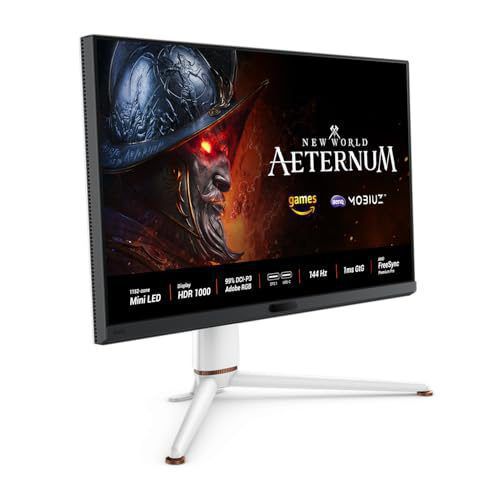
- Display Panel: 32-inch 4K UHD (3840 x 2160) IPS panel with 1,152 full-array local dimming zones.
- Sustained Brightness: Reaches 1,000 nits peak HDR brightness and maintains over 600 nits full-screen SDR brightness without ABL throttling.
- Standard RGB Subpixel Layout: Pure, crisp text rendering without color fringing or eye fatigue.
- Zero Burn-In Risk: Inorganic Mini-LED backlighting allows static taskbars and desktop tools to remain visible 24/7 without pixel decay.
- eARC & KVM Hub: Features USB-C 65W Power Delivery, built-in KVM, and eARC surround sound output.
For an in-depth evaluation, read our full BenQ MOBIUZ EX321UX Review.
The Value Champion: KOORUI G2721P (Fast IPS)
For mainstream gamers and budget-conscious buyers, the KOORUI G2721P demonstrates that 90% of PC users get a brighter, faster, and more worry-free experience for under $200.

- Panel Tech: 27-inch QHD (2560 x 1440) Fast IPS panel at 180Hz.
- Worry-Free Daily Use: Sustained high full-screen brightness, instant wake-from-sleep without maintenance cycles, and razor-sharp text clarity.
- Price-to-Performance: Costs a fraction of a flagship OLED, allowing you to invest saved funds into a faster graphics card.
For details, read our complete KOORUI G2721P Review.
Summary Recommendation
- Buy an OLED if your setup resides in a dark room, you use your PC primarily for night-time gaming and movies, and you don't mind managing maintenance cycles.
- Choose Mini-LED (BenQ EX321UX) if you want flagship 4K HDR visuals with 1,000-nit brightness, crisp text, and zero burn-in risk.
- Choose Fast IPS (KOORUI G2721P) if you want a reliable, high-refresh 1440p daily driver for under $200.
About the Author

Eli Nolan
Eli Nolan is a seasoned tech enthusiast and gaming monitor specialist. With years of experience testing the latest display technologies, Eli provides deep insights into performance, color accuracy, and value. When not benchmarking monitors, he can be found exploring the latest open-world RPGs or fine-tuning his workstation setup.